9 May 2026
How I Used ChatGPT to Improve My Zone 2 Training, Heart Rate and Aerobic Efficiency
A practical case study on using ChatGPT as a conversational AI running coach to improve Zone 2 training, lower resting heart rate, track aerobic efficiency, analyse run screenshots and prepare for a half marathon.
For years, I thought I was doing Zone 2 training properly. I had read the articles, watched the YouTube videos, listened to the podcasts. The problem is that "easy" is surprisingly hard to define when you are training yourself.
My version of easy was usually somewhere around 135 to 145 bpm. It felt controlled. It felt productive. It felt like I was doing the right thing.
But my running did not improve in the way I expected. My heart rate stayed stubbornly high. My easy runs often became moderate runs. My race pacing was erratic. I would start too fast, drift into threshold too early, and then spend the final miles of races surviving rather than racing.
I was not really doing Zone 2. I was living in the grey zone.
This is the story of how I used ChatGPT as a high-frequency running feedback loop to improve my aerobic efficiency, understand my heart rate, and prepare more intelligently for a half marathon.
The Problem With Running Apps
Most running apps give you data. They show pace, splits, heart rate, cadence, training load, recovery scores, and predicted race times. Some now add AI-style summaries. But most still do not really coach you. They do not deeply understand context.
If you upload a run where your heart rate drifted unusually high, you slept badly, your legs were sore from gym work, the run was stop-start, or you were intentionally running slowly to build aerobic base, the app usually treats it as another isolated data point.
It might tell you the run was "productive" or "maintaining", but it does not really help you understand what happened or what you should do next. The feedback loop is too weak.
The Problem With Real Coaches
Real coaches solve some of this. A good coach can interpret the bigger picture, adjust sessions, and stop you doing stupid things. But most amateur runners do not get real-time coaching after every run. You might get a weekly check-in, a training plan, or occasional feedback.
But running improvement often happens in the micro-decisions: should I run tomorrow? Was that really Zone 2? Why was my heart rate higher today? Should I push the long run? How much race pace work is enough? Did I actually improve or just feel better?
That is where I found ChatGPT surprisingly useful. Not as a replacement for coaching expertise, but as a constant interpretation layer.
What I Did Instead
I started using ChatGPT as a conversational running coach. Not in the basic sense of asking: "Write me a half marathon plan." That is too generic.
Instead, I used it as an adaptive feedback system. After almost every run, I uploaded screenshots from Strava or Garmin and asked ChatGPT to analyse them.
The process became: run, upload screenshots, summarise data, interpret, adjust next run, repeat. That feedback loop became the training system.
The Screenshot Workflow
One thing I learned quickly was that the model needed structured memory. So after uploading screenshots, I would ask ChatGPT to summarise the run into a table.
Usually I uploaded two or three screenshots:
- Headline run summary: distance, average pace, average heart rate, moving time
- Mile-by-mile splits: pace by mile, heart rate by mile
- Optional: elapsed pace view, heart rate graph, or race forecast
For split data, the format I used looked like this:
| Mile | Pace | HR |
|---|---|---|
| 1 | 12:15 | 125 |
| 2 | 12:22 | 130 |
| 3 | 12:15 | 130 |
| 4 | 12:15 | 128 |
This mattered because it converted screenshots into a usable training log. The conversation stopped being a series of isolated chats and became a cumulative dataset.
Key insight: The screenshots were not the system. The feedback loop was the system.
The Biggest Discovery: I Was Running Easy Runs Too Hard
The biggest breakthrough was simple. I was running my easy runs too hard.
Historically, I thought 135 to 145 bpm was easy for me. It felt manageable. It felt like I was training. But I was often drifting into moderate effort. I was not recovering properly, and I was not building the aerobic base I thought I was building.
ChatGPT repeatedly pushed me to slow down. Really slow down.
At first, this felt ridiculous. My easy runs became 12-minute miles, sometimes slower, occasionally with walk breaks, with heart rate around 125 to 130 bpm. Psychologically, it felt like going backwards.
But the data started to change.
The Zone 2 Progression
At the start, my low-heart-rate pace was inconsistent. I would often need to stop, slow down, or walk to keep heart rate under control. Over time, the pattern improved.
| Phase | Typical Pace | HR | Feel |
|---|---|---|---|
| Early | 12:50 to 13:20/mile | 127 to 135 bpm | Frustrating, stop-start |
| Middle | 12:35 to 12:55/mile | 125 to 130 bpm | More controlled, less drift |
| Recent | 11:59 to 12:25/mile | 125 to 130 bpm | Stable, low drift |
The important thing was not just that pace improved. It was that heart rate became more stable. That is aerobic efficiency.
Example: Controlled Parkrun
One of the best examples came during a Parkrun one week before Hackney Half Marathon. Historically, I would treat Parkrun like a race: start too fast, spike heart rate early, hang on at the end.
This time the plan was different. ChatGPT gave me a controlled progression plan: mile one controlled at around 9:15 to 9:25, mile two building toward 9:00, mile three a progressive effort to finish strong.
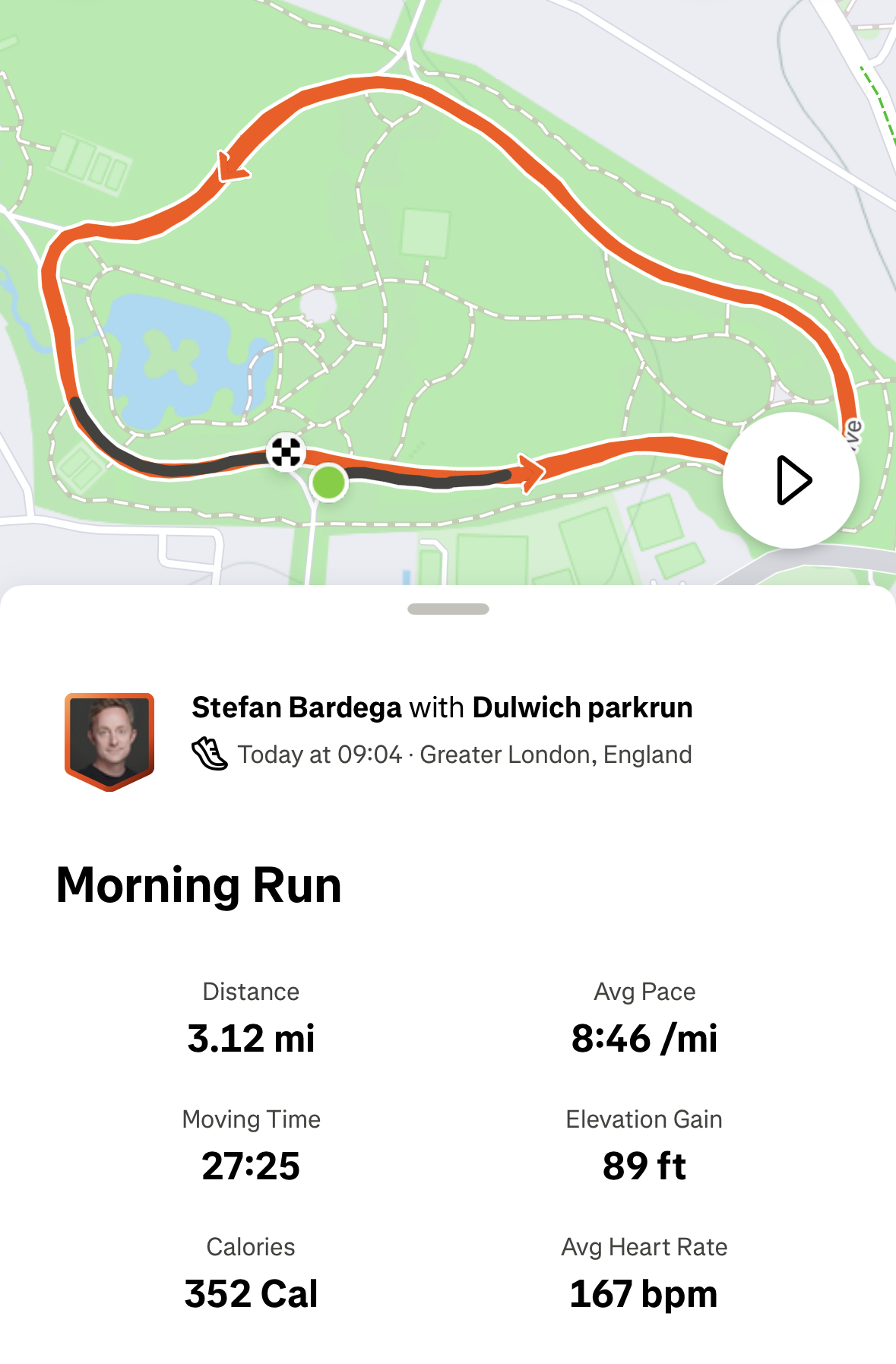
The result showed the plan working exactly as intended:
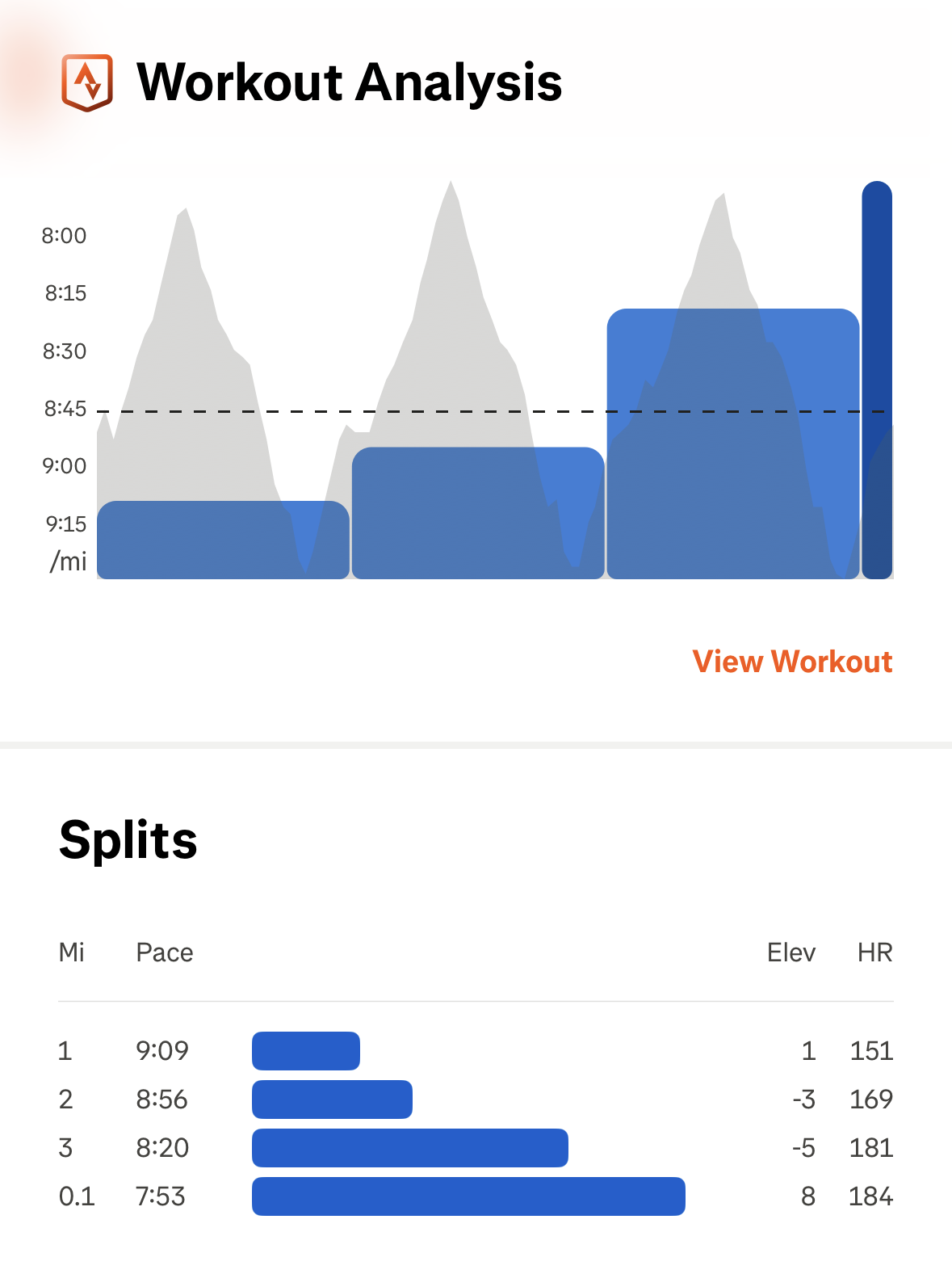
| Mile | Pace | HR |
|---|---|---|
| 1 | 9:09 | 151 bpm |
| 2 | 8:56 | 169 bpm |
| 3 | 8:20 | 181 bpm |
| 0.1 | 7:53 | 184 bpm |
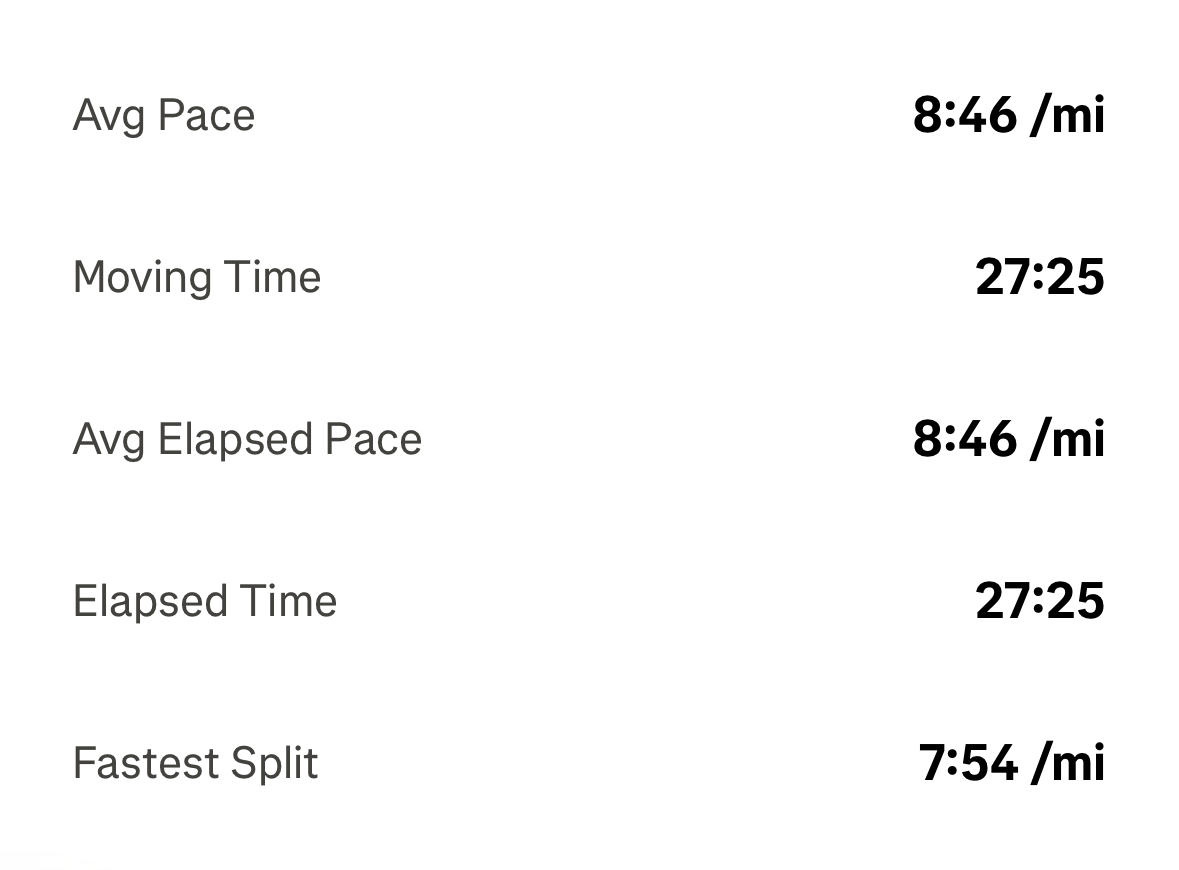
Final result: 27:25, 8:46/mile average, 167 bpm average HR. The most important thing was not the time. It was the pattern. I did not redline immediately. I delayed threshold exposure until later in the run. That is exactly what I needed to learn for the half marathon.
"The pace stopped controlling you. You started controlling the pace."
ChatGPT feedback after the race-pace interval session
Building the Race Strategy
The same process helped build my Hackney Half strategy. Instead of using a generic race calculator, we used my easy run HR data, my Parkrun pacing, race-pace intervals, previous half marathon mistakes, weather forecasts, and course elevation data.
| Phase | Target Pace | Target HR |
|---|---|---|
| Miles 1 to 3 | 9:15 to 9:25/mile | 150 to 158 bpm |
| Miles 4 to 9 | 9:05 to 9:15/mile | 158 to 165 bpm |
| Miles 10 to 13.1 | Push if controlled | 165 to 172+ bpm |
The key principle: stay under threshold early, then spend the red zone late. That was very different from how I had raced before.
My previous half marathon PB was around 1:58. But the heart rate data showed I had averaged around 176 bpm across much of that race, which meant too much of it was spent near or above threshold. The conclusion was not "you are not fit enough." It was "you misallocated effort." That distinction matters.
The Instructions I Used
The model became more useful when I gave it clearer instructions. Here is the kind of setup prompt that worked:
I want you to act as my running coach. I am training for a half marathon and want to improve aerobic efficiency, Zone 2 heart rate control and race pacing. I will upload screenshots after each run, usually a headline summary, mile splits and sometimes elapsed pace or HR graph.

Please always:
- Summarise the run into a structured table
- Extract distance, pace, average HR, elapsed pace where available
- Compare the run to previous runs
- Assess HR drift and aerobic efficiency
- Identify whether the run was easy, steady, race pace or too hard
- Recommend the next run based on fatigue and race goals
- Stop me turning easy runs into moderate runs
- Use heart rate as the key guide for easy running
- Be honest if I am overreaching
- Keep a running summary table of all key runs
The last point became important. I needed the model to create structured summaries so that the data was not trapped inside screenshots.
| Run | Distance | Avg Pace | Avg HR | Type | Takeaway |
|---|---|---|---|---|---|
| Early Z2 | 4 to 5 mi | 12:50 to 13:10 | 127 to 130 | Easy | Stop-start, unstable |
| Mid Z2 | 4 to 5 mi | 12:45 to 12:55 | 127 to 128 | Easy | Better control |
| Recent Z2 | 4.88 mi | 12:25 | 128 | Easy | Stable HR |
| Easy run | 4.4 mi | 11:59 | 126 | Easy | Faster at lower HR |
| Race pace reps | 3 x 6 min | 9:04 to 9:15 | <165 | Quality | Pace becoming controllable |
| Parkrun | 3.1 mi | 8:46 | 167 | Progression | Controlled start, strong finish |
What Changed Psychologically
The most important change was behavioural. Before, I would judge a run by pace, whether it felt hard, whether Strava looked good, whether I felt fit. These are all ego metrics.
Now I started judging runs by heart rate stability, drift, recovery quality, whether the session matched its purpose, and whether I could repeat the effort. This changed how I trained.
I stopped trying to prove fitness every day. That may have been the biggest improvement of all.
Most runners do not need more data. They need better feedback.
What This Means For AI Coaching
I do not think AI replaces great human coaches. But I do think conversational AI solves one major problem: feedback frequency.
Most runners already have enough data. What they lack is interpretation. ChatGPT became useful because it could interpret screenshots, maintain context, identify patterns, challenge emotional reactions, reinforce discipline, adapt the next session, and translate data into behaviour.
It did not just tell me what happened. It helped me decide what to do next.
The value was not that ChatGPT created a magical plan. The value was that it created a continuous feedback loop. Most training plans are static. This was adaptive.
Conclusion
The biggest improvement in my running did not come from a new watch, a new shoe, or a revolutionary training plan. It came from building a better feedback loop.
I used ChatGPT to slow down my easy runs, understand Zone 2 properly, identify heart rate drift, track aerobic efficiency, analyse Parkrun pacing, build a half marathon race plan, avoid overtraining, and make better decisions after almost every run.
The result was simple but powerful: I became less emotional and more analytical about training.
Most runners do not need more data. They need better feedback. And, increasingly, that feedback can be conversational.
Frequently Asked Questions
Can ChatGPT replace a running coach?
No. It should not be seen as a direct replacement for a qualified coach. Its value is in creating a high-frequency feedback loop between runs, interpreting data you already have, and helping you make better decisions consistently.
Can ChatGPT analyse Strava screenshots?
Yes. If you upload clear screenshots showing your run summary, splits, and heart rate data, it can help interpret pacing, drift, and effort patterns. The key is giving it enough context and asking it to maintain a structured log across sessions.
How many screenshots do you need per run?
Usually two or three: a headline summary, mile splits, and optionally an elapsed pace or heart rate graph. The splits screenshot is the most important for analysing whether the run was controlled or drifting.
What is Zone 2 running?
Zone 2 running is low-intensity aerobic training where effort is controlled enough to build endurance without accumulating excessive fatigue. For most runners, this means keeping heart rate roughly in the 120 to 140 bpm range, though the exact zone depends on your individual max heart rate and fitness level.
How did ChatGPT help improve aerobic efficiency?
It helped interpret heart rate trends, identify when easy runs were too hard, recommend recovery runs, and track pace improvements at the same heart rate over time. The key was using it consistently after every run rather than as a one-off tool.
Global Head of Performance Marketing at IDX